Windows Performance Center is a fake pop-up/warning that impersonates Microsoft Windows XP Security Center and reports false system security threats to make you think that your sensitive information is not secure or that your computer is infected with malware. It's a part of rogueware attack. Usually, clicking on a malicious search result yields this fake Windows Performance Center warning. If you click on the "Fix all" button then another pop up will show up and will prompt you to install the rogue anti-virus program called Security Tool (could be any other rogue program actually) to remove the infections which don't even exist.
If you find that your computer is infected with Security Tool or any other rogue antivirus program, please use a reputable anti-malware program to remove malware form your computer as soon as possible. You may choose from several legitimate and free anti-spyware or anti-malware programs to remove Windows Performance Center malware.
In case of Security Tool malware infection, please read this article: How to remove Security Tool. If you have any questions or additional information about this infection please leave a comment. Good luck and be safe!
Alphaantivir.com is a misleading web site that promotes the rogue anti-spyware program called Antispyware Soft. If your computer is already infected with this malware then you may see Alphaantivir.microsoft.com instead of Alphaantivir.com in your web browser's address bar. However, please note that Microsoft has nothing to do with this scan campaign. Alphaantivir.com is a typical fake web site that provides false information about Antispyware Soft. Such web sites usually doesn't host any malicious or harmful files so they can't infect your computer directly. On the other hand, such fake web sites as Alphaantivir.com may redirect you other pages that host malware. One way or another, you should avoid such misleading web sites.
If you find that your computer is infected with the rogue program, please follow Antispyware Soft removal instructions. And remember, don't purchase it. If you have already bought this fake program then you should contact your credit card company and dispute the charges. If you have any questions or additional information about this infection, don't hesitate and leave a comment. Good luck!
Antispyware Soft is a fake anti-spyware program that reports false system security threats to make you think that your computer is infected with malicious software. Basically, it's a clone of widely spread rogue program called Antivirus Soft. Some users wrote for us that Antispyware Soft just appeared and started to scan their computers and that they got disconnected from the Internet. They cannot run any programs at all or install anything. They are actually right; these are the main symptoms of AntispywareSoft malware. If you are reading this article then your computer is probably infected with pesky virus. Thankfully, this fake program can be removed for free using legitimate anti-malware programs. Please follow the removal instructions below to uninstall Antispyware Soft from your computer.
The most annoying thing about this fake program is that Antispyware Soft blocks nearly all legitimate programs and of course it blocks anti-virus and anti-spyware programs in the first place. It displays an error message with the following text:
"Security warning Application cannot be executed. The file rundll32.exe is infected. Do you want to activate your antivirus software now?"
In reality, thought, rundll32.exe isn't infected; Antispyware Soft just wants to make you think that it is. As usual, rogue programs display many fake security warnings and AntispywareSoft is not an exception. It also constantly displays fake alerts stating that your computer is infected with malware. The rogue program impersonates Windows Security Center and reports several fake infections, for example:
"Antvirus software alert Infiltration alert - Virus attack Your computer is being attacked by internet virus. It could be a password stealing attack, a trojan - dropper or similar. Threat: Win32/Nuqel.E Threat: BankerFox.A"
It gives another threat every few seconds. This fake program is prompted through the use of such misleading web sites as Alphaantivir.com or Trojans. It may come bundled with other malware too.
Now, the most important question is how to remove this malware from PC? First of all, you will have to reboot your computer is Safe Mode with Networking, disable proxy server for Internet Explorer and download free and reputable anti-malware program to remove this infection. If you can't reboot your computer is Safe Mode with Networking then you will have to use HijackThis tool to stop the main processes of Antispyware Soft malware. Please follow detailed Antispyware Soft removal instructions below. Most importantly, don't purchase it. If you have already purchased this fake program then you should contact your credit card company and dispute the charges. If you have any questions or additional information about this virus please don't hesitate and leave a comment. Good luck and be safe!
Antispyware Soft removal instructions (in Safe Mode with Networking):
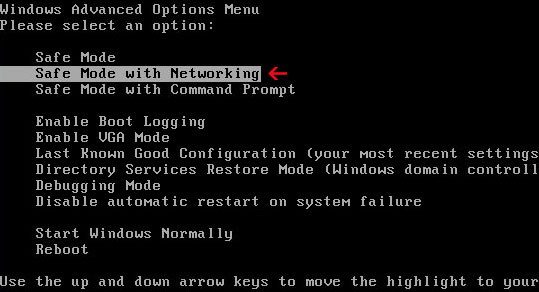
1. Reboot your computer is "Safe Mode with Networking". As the computer is booting tap the "F8 key" continuously which should bring up the "Windows Advanced Options Menu" as shown below. Use your arrow keys to move to "Safe Mode with Networking" and press Enter key. Read more detailed instructions here: http://www.computerhope.com/issues/chsafe.htm
NOTE:Login as the same user you were previously logged in with in the normal Windows mode.
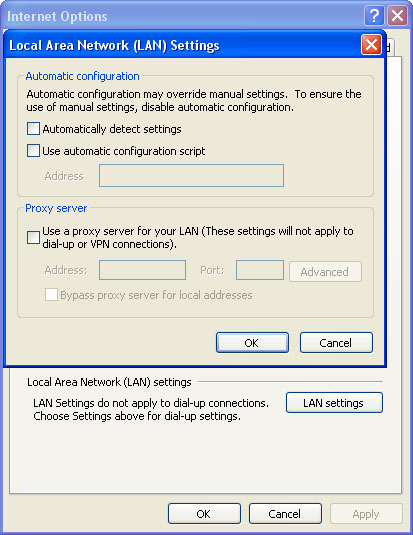
2. Launch Internet Explorer. In Internet Explorer go to: Tools->Internet Options->Connections tab. Click Lan Settings button and uncheck the checkbox labeled Use a proxy server for your LAN. Click OK.
3. Download SUPERAntispyware, MalwareBytes Anti-malware or Spybot - Search & Destroy and run a full system scan.NOTE: before saving the selected program onto your computer, please rename the installer to winlogon.exe or iexplore.exe. Launch the program and follow the prompts. Don't forget to update the installed program before scanning. Then reboot your computer in "Normal Mode" and run a system scan again. That's it! 4. New threats appear every day. In order to protect your PC from such (new) infections we strongly recommend you to use ESET Smart Security. Alternative Antivirus Soft removal instructions using HijackThis (in Normal mode):
1. Download iexplore.exe (NOTE: iexplore.exe file is renamed HijackThis tool from TrendMicro). Launch the iexplore.exe and click "Do a system scan only" button. If you can't open iexplore.exe file then download explorer.scr and run it.
2. Search for similar entries in the scan results: O4 – HKLM\..\Run: [mxdeorsw] C:\Documents and Settings\User\Local Settings\Application Data\rmqwne\lkwctssd.exe O4 – HKCU\..\Run: [mxdeorsw] C:\Documents and Settings\User\Local Settings\Application Data\rmqwne\lkwctssd.exe R1 – HKCU\Software\Microsoft\Windows\CurrentVersion\Internet Settings,ProxyServer = http=127.0.0.1:5555
The process name will be different in your case. But it has the same structure: [RANDOM]tssd.exe Select all similar entries and click once on the "Fix checked" button. Close HijackThis tool.
3. Download SUPERAntispyware, MalwareBytes Anti-malware or Spybot - Search & Destroy and run a full system scan.NOTE: before saving the selected program onto your computer, please rename the installer to winlogon.exe or iexplore.exe. Launch the program and follow the prompts. Don't forget to update the installed program before scanning.
Antispyware Soft associated files and registry values:
411online-scanner-free.org is yet another malicious web site classified as a browser hijacker that promotes the rogue anti-spyware program called Antivirus Plus. It's a typical browser hijacker that reports false system security threats to make you think that your computer is infected with malicious software. You shouldn't download or install anything from 411online-scanner-free.org as you may end update with infected computer.
The rogue program itself is just another scam that uses misleading methods to trick you into purchasing the program. If your PC was inadvertently infected by this malware, then you should use legitimate anti-malware software to remove it from your computer as soon as possible. You can choose from:
Fake warning "Copyright Violation: Copyrighted Content Detected" is a part of ransomware infection that attempts to convince you to pay a fee for allegedly found copyrighted material on your computer. Actually it's a Trojan horse Trojan.Fakecopyright [Symantec]. Once this Trojan is installed, it will scan your computer for .torrent files and then will display fake Copyright Violation alert window stating that copyrighted material have been found and that you should pay a fee ($399.85) or they will pass your case to the courts where you will be tried by a judge. That's ridiculous, you shouldn't trust it. This is yet another scam. If you find that your computer is infected with I-Q Manager Antipiracy foundation (Copyright Violation: Copyrighted Content Detected) ransomware please follow the removal instructions below to remove it from your PC as soon as possible.
(Video by rogueamp)
"Copyright violation alert Copyright violation: copyrighted content detected Windows has detected that you are using content that was downloaded in violation of the copyright of its respective owners. Please read the following bulletin and try solving the problem in one of the recommended ways."
If you select the "Pass the case to court", or "Settle case in pre-trial order", the threat will attempt to display a web page that contains an online order form for the amount of $399.85.
The biggest problem is that this threat then may lock the compromised computer until the user enters a correct license number for the program. Thankfully, S!Ri posted a registration code which should unlock your computer: RFHM2-TPX47-YD6RT-H4KDM. (I haven't tested it, so I don't know for sure)
The home page of the bogus ICPP Foundation is icpp-online.com (193.33.114.77). You should add it and add icpp-online.com to the list of blocked web sites. Also note that this fake Copyright Violation alert has been localized to the following languages: Czech, Danish, Dutch, English, French, German, Italian, Portuguese, Slovak and Spanish.
1. Click Start -> Control Panel 2. When in the Control Panel, double-click on one of the options below depending on your version of Windows a) Add or Remove Programs icon (for Windows XP users) b) Uninstall Program (for Windows Vista and Windows 7 users) 3. The Add or Remove Programs (Windows XP) or the Uninstall Program (Windows Vista & 7) screen will be displayed. Scroll through the list of programs and look for entries with I-Q Manager, uninstall them. You are done, close the Control Panel screen. NOTE: If the programs ask you to reboot your computer, do not allow it to reboot until you have uninstalled all of the program.
Your computer should now be free of the I-Q Manager or Copyright Violation: Copyrighted Content Detected malware. However, if it's still on your computer then complete these additional steps:
1. Click Start -> Run. 2. Input: regedit. Then click OK. 3. Navigate to and delete the following registry entries and subkeys:
If you see a notification that pops up from the Windows taskbar and it's titled "Security breach!" then your computer is infected with XP Internet Security 2010 malware. Fake Security breach! alert reads:
"Security breach! Beware! Spyware infection was found. Your system security is at risk. Private information may get stolen, and your PC activity may get modified. Click for an anti-spyware scan."
Here's how it looks like:
As you can see, it looks like a legitimate notification from the Windows taskbar. However, this one is fake and it's a part of XP Internet Security 2010 scam. The rogue program wants to make you think that your computer is infected with malicious software. Then it prompts you to pay for a so called "full" version of the program to remove the infections which don't actually exist. Most importantly, don’t purchase this bogus program! If you find that your computer is infected with this malware and you constantly see "Security breach!" notification on your computer screen, then please follow the XP Internet Security 2010 removal instructions to remove this virus from your computer for free using legitimate anti-malware programs. If you have any questions or additional information about this infection, don't hesitate and leave a comment. Good luck and be safe!
Yet another fake XP Internet Security 2010 notification:
"Virus infection! System security was found to be compromised. Your computer is now infected. Attention, irreversible system changes may occur. Private data may get stolen. Click here now for an instant anti-virus scan."
This fake warning states that your sensitive information can be stolen. Just like all the other fake warnings from XP Internet Security 2010 malware, "Virus infection!" was made to scare you into thinking that your computer is infected with malicious software. Then the rogue program prompts you to pay for a full version of the program to remove the infections which in reality don't even exist. Don't purchase it! Instead, please use the XP Internet Security 2010 removal instructions to remove this virus from your computer for free using legitimate anti-malware programs. If you have already purchased this phony program then you contact your credit card company and dispute the charges. If you have any questions or additional information about this infection, please don't hesitate and leave a comment. Good luck and be safe!